D1_Two-Bone-IK
Le 二 28 七月 2026
最近花了一些时间来在JMonkeyEngine中实现IK解算器,我被四元数以及JMonkeyEngine的各种怪脾气给折磨的够久的了。那么这篇文章大概会先简单介绍一些通常的IK算法,然后是我在JME中实现双骨骼IK的过程,权当给自己做点记录。如果有错误,还请原谅,非常欢迎您指出。
目前常用的IK算法并不多,并且各有各的脾气,要么需要比较庞大的算力,要么快速但效果有限。
常见IK算法
第一种,行业中使用的比较多的,速度也比较快的 FABRIK 算法。它可以应用于任何长度的链,并且一般在1~5次迭代内就能收敛,这是优点。而缺点也很明显,但是比较容易修复,它只管把骨骼拉到目标点,而不管骨骼怎么旋转,因此达到目标点时可能会出现骨骼错误扭转的情况,这种情况可以增加后处理阶段,重新扭转骨骼到正确位置,比如在处理手臂时,可以提前标记掌心朝向,以及计算小臂与大臂内侧等数据,在后处理阶段重新校正。因为其速度快,并且缺点易于弥补,它是目前带有IK解算器的游戏引擎常用的算法。
第二种,CCD算法,或者叫循环坐标下降方法。原理非常简单,就是从末端骨骼开始,逐个获取当前骨骼到链末端的向量以及到目标的向量,然后旋转关节使两个向量重合,直到到达根骨骼,此为一次迭代,然后重复迭代,直到足够接近目标。其优点就是,实现极为简单。这个算法同样可以处理任意长度的链。但是缺点是末端的骨骼容易发生不自然的卷曲,也就是末端骨骼旋转的非常多,但是根骨骼几乎不转,因此它并不适合于人体骨骼。以及此算法收敛速度较慢,需要多次迭代。同时,它存在一些特殊的奇异点,比如目标在正上或正下方时易发生在目标点附近抖动的问题。
第三种,双骨骼IK算法(Two-Bone IK),也就是我使用的方法,也是所有算法中可以说是最简单的方法。优点是只需一次计算即可得到结果,根本不存在收敛问题,并且仅使用了中国高中数学的余弦定理,而无需矩阵等复杂计算,性能极佳。但是缺点也很明显,它只能处理三段骨骼的链(链中的骨骼数量必定等于三),并且只能控制其中两段,多的一段用于提供数据。并且它除了目标点外,还需要一个极向目标点(Pole Vector/极向量)用于指示关节弯曲方向。但是它仍然是大多数游戏引擎都会有的一个算法。
第四种,雅可比矩阵算法,基于线性代数,一共有三种变体,本人水平不高无法理解,因此不做强行解释。优点是理论最完备,可以适配任意约束,任意链长,甚至可以微调每个骨骼的权重实现符合特定姿态。但是缺点是最明显的,计算量大,仍然存在奇异点,实现困难,难以调参。因此纯雅可比算法通常不用在任何游戏引擎中,通常用于离线计算或者动捕绑定工具。
这四种算法都各有各的脾气,而在Java/Kotlin的生态中,可选项较少,目前我找到的,可以直接调用而无需使用JNI的,仅有Caliko、Everything-will-be-IK(EWBIK)这两个库,EWBIK使用的是CCD算法,而Caliko是FABRIK算法,均为平台无关的解算库,由于EWBIK的仓库比较混乱,带有Processing实现、纯解算库(不使用常见的构建方式)以及 使用Gradle构建的纯解算库,因此我仅在这贴出纯解算库的地址,请自行研究。
那么,接下来先讲解双骨骼IK的原理,然后是我在JME中实现它遇到的问题以及解决的方法。
原理
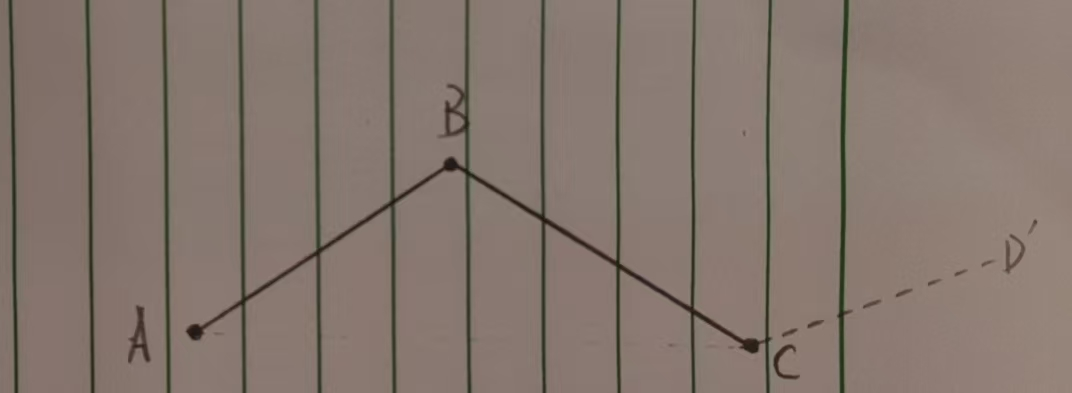
请看下图,这是一条三段骨骼的链,其中AB为父骨骼,BC为子骨骼,而虚线CD'所代表的是BC的子骨骼,但是它仅是为了提供计算所需的数据,并不被实际操控。
这里需要说明的是,一段骨骼在引擎中实际上只有一个点,而在建模软件中看到的一段一段的骨骼只是一种可视化效果,这也导致,一段骨骼并不存在长度这种参数,所以我们需要第三段骨骼,也就是BC的子骨骼来帮助我们计算子骨骼的长度。
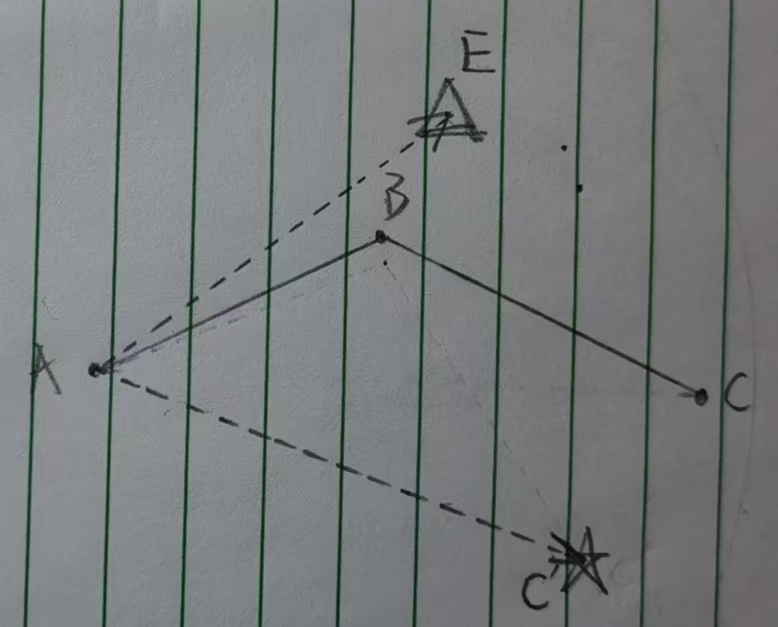
那么我们首先做些初始工作,我们需要一个极向目标点(也就是Pole Vector或极向量)和一个目标点。极向目标点负责指示关节的弯曲方向,目标点负责指示子骨骼最后需要到达的位置。下图中,我们使用三角形表示极向目标点,用星星表示目标点。接下来的所有计算均是发生在空间中的,但是为了保持清晰,此处使用平面图形。
从根骨骼位置指向目标点的向量,我们称作方向向量。从根骨骼位置指向极向目标点的向量,我们称作弯曲方向向量(非业内专业用语)。这两个向量可以构成一个平面,我们称之为IK平面。
双骨骼IK的原理实际上非常简单且直观,主要分为以下的步骤:
1.计算角度: 通过根骨骼长度、子骨骼长度、方向向量长度,配合余弦定理来计算从方向向量与根骨骼目标位置的夹角。 2.旋转根骨骼:我们先使根骨骼指向目标,即与方向向量同向,然后再旋转刚才计算的角度。 3.旋转子骨骼:最后我们只要将子骨骼指向目标即可。
接下来我们会讲解通用的实现方法。
通用实现
我们先来实现计算角度。 我们需要记住的是,一段骨骼在引擎中就只是一个点,所以我们需要依靠当前骨骼与它的下一段骨骼来计算当前骨骼的长度,以及我们需要的代表当前骨骼的向量。
我们可以通过 子骨骼的位置-当前骨骼的位置得到代表这段骨骼的向量。它的模长就是骨骼的长度。
计算根骨骼的目标位置与方向向量的夹角,我们使用了余弦定理:

其中的acos是反余弦函数,它会将一个余弦值转换为角度,而括号内部则是余弦定理的其中一种变体。
此处的余弦定理计算的是a边所对的角A的余弦值,在我们这里所对应的就是链中的子骨骼,也就是下图中的BC
然后,我们开始旋转父骨骼。
因为我们计算出的角度,是以方向向量作为起始的,所以我们需要先把根骨骼旋转到方向向量的方向,也就是指向目标点。
这里有两种方式,一种是投影的方式,一种是四元数的方式,因为大多数引擎都有四元数的方式,所以我们在此只介绍使用四元数的方法。
在此,我们使用角度+旋转轴的方式来构建四元数。
角度可以使用下方的公式计算

旋转轴即为两向量叉乘所得的向量。
然后你可以用你的引擎的方法来构造这个四元数,有的引擎会提供像fromAngleAxis()这样的方法,你可以传入一个角度以及一个旋转轴来构造四元数。
构造四元数后,我们将它应用到根骨骼上。此时根骨骼应该指向目标点。 这个过程你可以封装为一个方法,你可以传入一个当前方向的向量和一个你希望的方向的向量,然后就可以让骨骼旋转到你想要的那个方向去。此处有一个技巧,如果你将这两个向量均一化,它们的点乘结果可以直接放入反余弦函数,因为模长是1,分母也就消失了
然后依然通过角度+旋转轴的方法来将根骨骼旋转到根骨骼应该在的位置上。
角度就是我们刚刚使用余弦定理计算出的角度,而旋转轴则使用方向向量与弯曲方向向量进行叉乘得到的向量,即IK平面的一条法向量。
此处需要注意的是,在我们没法控制法向量指向的方向,比如一张平整的白纸,它的法向量可以是垂直纸面向外的,也可以是垂直纸面向里的,而以它作为旋转轴,如果方向不一样,旋转的方向就不一样,可能会顺时针转,也可能会逆时针转,这都取决于旋转轴的方向。
所以我们可以先使用四元旋转那条代表骨骼的向量,然后将结果与弯曲向量进行点乘,如果结果小于0,那么说明它们成钝角,也就是旋转的方向是错的,只要将旋转轴反向即可。
需要注意的是,这个操作只需要在将根骨骼从指向目标点的方向旋转到根骨骼应该在的位置时才需要,而将根骨骼旋转到指向目标点方向时无需这样做
应用这次旋转到根骨骼后,根骨骼已经处于正确的位置上。
最后,我们要让子骨骼指向目标。
你可以使用引擎自带的lookAt方法,当然,我这里依旧使用了角度+旋转轴的方法,也就是前面封装的传入两个向量的方法,只要使用目标的位置减去当前的子骨骼位置,即可得到子骨骼正确的方向,然后传入当前的子骨骼的向量即可。
此时也不需要顾及旋转轴问题。
应用旋转后,子骨骼也到达预计的位置,如果计算和应用没出问题,子骨骼应该指向目标点的位置,并且关节的弯曲方向应该向极向目标点的方向。
我在JME中如何实现的
上面的内容基本就是我如何实现它的,当然,我没有在这里提及如果目标点的距离超出两个骨骼的长度了怎么办之类的情况,因为就只是把骨骼拉直,然后指向目标点。同时,我的解算器没考虑奇异点的情况,因为在实际应用时,我会增加一些约束,所以难以触及奇异点。
而在JME中,问题有很多,比如骨骼的坐标系非常混乱,延迟更新机制导致的根骨骼旋转后无法及时获取正确的子骨骼位置数据等。解决方案实际比较简单,骨骼的坐标系实际上是任何带有Local字段的方法,都是获取相对于父骨骼的位置或者旋转,而使用getModelTransform().getXXXX()方法获得的才是相对于模型根节点的位置和旋转。其中最需要注意的就是旋转,由于设置旋转时使用的是setLocalRotation(),因此必须乘上父骨骼的旋转四元数的逆来抵消父骨骼的旋转才可以正常应用。至于延迟更新导致的无法获取当前正确的子骨骼位置的问题,只需要旋转骨骼后调用旋转的骨骼的update方法即可,这样可以更新当前骨骼的数据以及子骨骼的数据。
那么本篇就到这里,这篇文章比较长,因为我假设读者仅仅具有基础的数学知识,而不具有IK相关的经验,所以我希望尽量完备的介绍IK。也许写的比较复杂和弯绕,还请见谅。我仍然非常建议您去研究IK的相关内容,我的实现大概并不是最好的方法,更不是最容易理解的。最后,感谢您阅读到这里。
Par QingYu, Catégorie : misc
Tags : Programming /
Autres articles
C2_Use Jpype+LibGDX to develop a game in EN
Le 日 05 四月 2026
按照上一篇所说,我会在这一篇中,较为详细的说明,如何使用Jpype+LibGDX这样的技术栈进行一些开发。注意,我不建议你把它用在生产中,但是你都固执到想要 …
Par QingYu, Catégorie : misc
Lire la suite …P1_ProjectLauncher
Le 六 07 三月 2026
本篇为个人工具项目ProjectLauncher的介绍,如果感兴趣,可以直接复制代码,整个项目总共为两个文件,并且只是为了文件看起来好看而分开 …
Par QingYu, Catégorie : misc
Lire la suite …C2_Use Jpype+LibGDX to develop a game
Le 六 28 二月 2026
按照上一篇所说,我会在这一篇中,较为详细的说明,如何使用Jpype+LibGDX这样的技术栈进行一些开发。注意,我不建议你把它用在生产中,但是你都固执到想要 …
Par QingYu, Catégorie : misc
Lire la suite …C1_StarBeats
Le 六 28 二月 2026
Introduce my Programming projects.
Par QingYu, Catégorie : misc
Lire la suite …C1_StarBeats in EN
Le 六 28 二月 2026
Introduce my Programming projects.